Breaking Thread Caps: Designing a High-Throughput HTTP Reverse Proxy with Java 21 Virtual Threads
Scaling web applications to handle tens of thousands of concurrent users has traditionally been an engineering tightrope walk. Conventional Java server frameworks (such as Apache Tomcat or Jetty) utilize a Thread-Per-Request model. In this world, every incoming HTTP connection maps directly to a single Operating System (OS) kernel thread.
When your application relies heavily on network I/O—such as querying a slow database or calling a downstream microservice—these heavy threads spend most of their lifecycles trapped in a blocked state.
Project Loom, introduced in Java 21, fundamentally rewrites this paradigm via Virtual Threads. This guide walks through how to build, containerized, profile, and benchmark a high-throughput HTTP proxy from scratch, demonstrating how Virtual Threads let us clear 3x more traffic than traditional platform thread pools under identical system constraints.
Understanding the Paradigm Shift: Normal Threads vs. Virtual Threads
1. The Old Way: Normal Threads (Thread-Per-Request)
In a traditional Java application, a Normal Thread is directly tied to an Operating System (OS) kernel thread. Think of a normal thread as a dedicated personal assistant assigned to a customer.
Here is what happens when a request comes in:
- The Request Arrives: A customer walks into the bank wanting to fetch data. Your application assigns a Normal Thread (the assistant) to help them.
- The Assistant Goes to Work: The assistant walks up to a physical teller (CPU core) to start processing.
- The I/O Block (The Bottleneck): The request needs to fetch data from a database or an external API. In our bank, this is like the assistant realizing they have to wait for a fax confirmation from another branch that takes 10 minutes to arrive.
- Wasted Resources: While waiting for the fax, the assistant stands right there at the teller counter, frozen, blocking anyone else from using that teller. Because normal threads are heavy and limited by the OS, you can usually only spin up a few hundred of them (e.g., a pool of 200). If all 200 assistants are frozen waiting for their "faxes" (network I/O), the entire bank grinds to a halt. New customers are forced to wait outside in a long line (the network backlog queue), even if the physical tellers (CPU) are technically doing nothing.
2. The New Way: Java 21 Virtual Threads
Virtual Threads break this limitation by decoupling the "assistant" from the "teller counter." A Virtual Thread is a lightweight thread managed entirely by the Java Virtual Machine (JVM) inside your computer's memory (the Heap), rather than by the operating system kernel.
Here is how the exact same scenario plays out with Virtual Threads:
- The Request Arrives: A customer walks in. Java instantly assigns a Virtual Thread to them. Because these are incredibly lightweight (they take up virtually no memory compared to normal threads), Java can easily create hundreds of thousands of them at once.
- Mounting: The Virtual Thread "mounts" onto a temporary normal thread (called a Carrier Thread) and walks up to the teller counter (CPU core) to do work.
- The I/O Block (The Magic Happens): The request hits the 100ms database network wait.
- Unmounting: Instead of standing there frozen, the JVM instantly unmounts the Virtual Thread. It freezes the Virtual Thread's current state, moves it over to sit on a "waiting bench" in memory, and frees up the carrier thread and physical teller instantly.
- Maximum Efficiency: While your request is waiting for its data, that physical teller counter is immediately used to serve the next customer's virtual thread. When your data finally arrives from the network, your virtual thread wakes up, leaves the waiting bench, mounts onto any available carrier thread, and finishes its job.
1. Core Architecture Design
To evaluate the thread models objectively, this controlled architectural ecosystem consists of three separate components:
- The Load Generator (
wrk): A high-efficiency HTTP benchmarking tool that floods our proxy with thousands of concurrent connections. - The High-Throughput Proxy (Port 9000/9001): A bi-directional streaming server that catches traffic and bridges it forward. It can toggle dynamically between traditional OS Platform Threads and modern Virtual Threads.
- The Mock Backend Server (Port 8080): A simulated downstream microservice that introduces a fixed 100-millisecond network latency/sleep to mirror real-world database or API network blocking.
2. Step-by-Step Implementation from Scratch
Step 1: Setting up the Maven Environment (pom.xml)
Create a new directory named vt-benchmarking-proxy and initialize your Maven Project Object Model configuration file. This configures the compiler plugin to target the Java 21 runtime.
<?xml version="1.0" encoding="UTF-8"?>
<project xmlns="http://maven.apache.org/POM/4.0.0"
         xmlns:xsi="http://www.w3.org/2001/XMLSchema-instance"
         xsi:schemaLocation="http://maven.apache.org/POM/4.0.0 http://maven.apache.org/xsd/maven-4.0.0.xsd">
    <modelVersion>4.0.0</modelVersion>

    <groupId>com.benchmarking</groupId>
    <artifactId>vt-proxy</artifactId>
    <version>1.0-SNAPSHOT</version>

    <properties>
        <maven.compiler.source>21</maven.compiler.source>
        <maven.compiler.target>21</maven.compiler.target>
        <project.build.sourceEncoding>UTF-8</project.build.sourceEncoding>
    </properties>

    <build>
        <plugins>
            <!-- Compiler Configuration targeting Java 21 -->
            <plugin>
                <groupId>org.apache.maven.plugins</groupId>
                <artifactId>maven-compiler-plugin</artifactId>
                <version>3.11.0</version>
                <configuration>
                    <release>21</release>
                </configuration>
            </plugin>

            <!-- Packaging Layer Layout Configuration -->
            <plugin>
                <groupId>org.apache.maven.plugins</groupId>
                <artifactId>maven-jar-plugin</artifactId>
                <version>3.3.0</version>
                <configuration>
                    <archive>
                        <manifest>
                            <addClasspath>true</addClasspath>
                        </manifest>
                    </archive>
                </configuration>
            </plugin>
        </plugins>
    </build>
</project>
Step 2: Coding the Delayed Mock Backend
This component binds to port 8080 and uses an embedded HTTP server running an asynchronous Virtual Thread executor loop. It intentionally calls Thread.sleep(100) to simulate real-world, deep network latency bottlenecks.
Create the file path: src/main/java/com/benchmarking/backend/MockBackend.java
package com.benchmarking.backend;

import com.sun.net.httpserver.HttpServer;
import com.sun.net.httpserver.HttpHandler;
import com.sun.net.httpserver.HttpExchange;
import java.io.IOException;
import java.io.OutputStream;
import java.net.InetSocketAddress;
import java.util.concurrent.Executors;

public class MockBackend {
    public static void main(String[] args) throws IOException {
        HttpServer server = HttpServer.create(new InetSocketAddress(8080), 0);

        server.createContext("/api/data", new HttpHandler() {
            @Override
            public void handle(HttpExchange exchange) throws IOException {
                try {
                    // Simulate 100ms of deep database/IO backend latency
                    Thread.sleep(100);
                } catch (InterruptedException e) {
                    Thread.currentThread().interrupt();
                }

                String response = "Hello from the Java Mock Backend!";
                exchange.sendResponseHeaders(200, response.getBytes().length);
                try (OutputStream os = exchange.getResponseBody()) {
                    os.write(response.getBytes());
                }
            }
        });

        // Use Virtual Threads to ensure backend processing does not become our bottleneck
        server.setExecutor(Executors.newVirtualThreadPerTaskExecutor());
        System.out.println("Mock Backend successfully running on http://localhost:8080/api/data");
        server.start();
    }
}
Step 3: Coding the High-Throughput Proxy Server
This proxy intercepts incoming client requests and opens parallel low-level TCP streaming pipe connections to the backend. It toggles its execution context based on the flags -DuseVirtual and -DbackendHost.
Create the file path: src/main/java/com/benchmarking/proxy/HighThroughputProxy.java
package com.benchmarking.proxy;

import java.io.*;
import java.net.*;
import java.util.concurrent.*;

public class HighThroughputProxy {
    private static final int PROXY_PORT = 9000;
    private static final String BACKEND_HOST = System.getProperty("backendHost", "localhost");
    private static final int BACKEND_PORT = 8080;

    public static void main(String[] args) throws IOException {
        boolean useVirtualThreads = Boolean.parseBoolean(System.getProperty("useVirtual", "false"));

        ExecutorService executor;
        if (useVirtualThreads) {
            // Virtual Thread Model: Light, unbounded user-space threads allocated on the heap
            executor = Executors.newVirtualThreadPerTaskExecutor();
        } else {
            // Platform Thread Model: Simulating standard fixed enterprise thread pools (e.g., Tomcat defaults)
            executor = Executors.newFixedThreadPool(200);
        }

        System.out.println("=========================================================");
        System.out.println(" PROXY STARTING ON PORT " + PROXY_PORT);
        System.out.println(" Thread Model: " + (useVirtualThreads ? "VIRTUAL THREADS" : "PLATFORM THREADS (Pool: 200)"));
        System.out.println("=========================================================");

        try (ServerSocket serverSocket = new ServerSocket(PROXY_PORT)) {
            while (true) {
                Socket clientSocket = serverSocket.accept();
                executor.submit(() -> handleConnection(clientSocket));
            }
        }
    }

    private static void handleConnection(Socket clientSocket) {
        try (Socket backendSocket = new Socket(BACKEND_HOST, BACKEND_PORT);
             InputStream clientIn = clientSocket.getInputStream();
             OutputStream clientOut = clientSocket.getOutputStream();
             InputStream backendIn = backendSocket.getInputStream();
             OutputStream backendOut = backendSocket.getOutputStream()) {

            // Asynchronously route Client -> Backend requests using a fast virtual thread
            Thread clientToBackend = Thread.ofVirtual().start(() -> pipe(clientIn, backendOut));

            // Synchronously stream Backend -> Client responses on the worker thread
            pipe(backendIn, clientOut);

            clientToBackend.join();
        } catch (IOException | InterruptedException ignored) {
            // Suppress stream disruptions under heavy load to prevent log bloating
        } finally {
            try {
                clientSocket.close();
            } catch (IOException ignored) {}
        }
    }

    private static void pipe(InputStream in, OutputStream out) {
        byte[] buffer = new byte[4096];
        int bytesRead;
        try {
            while ((bytesRead = in.read(buffer)) != -1) {
                out.write(buffer, 0, bytesRead);
                out.flush();
            }
        } catch (IOException ignored) {}
    }
}
3. Empirical Analysis: Profiling the JVM via JProfiler
We attached JProfiler directly to the proxy instance under a load of 500 concurrent connections via wrk -t4 -c500 -d20s to capture the underlying differences between the two thread models.
Scenario A: Platform Thread Pool Tracking
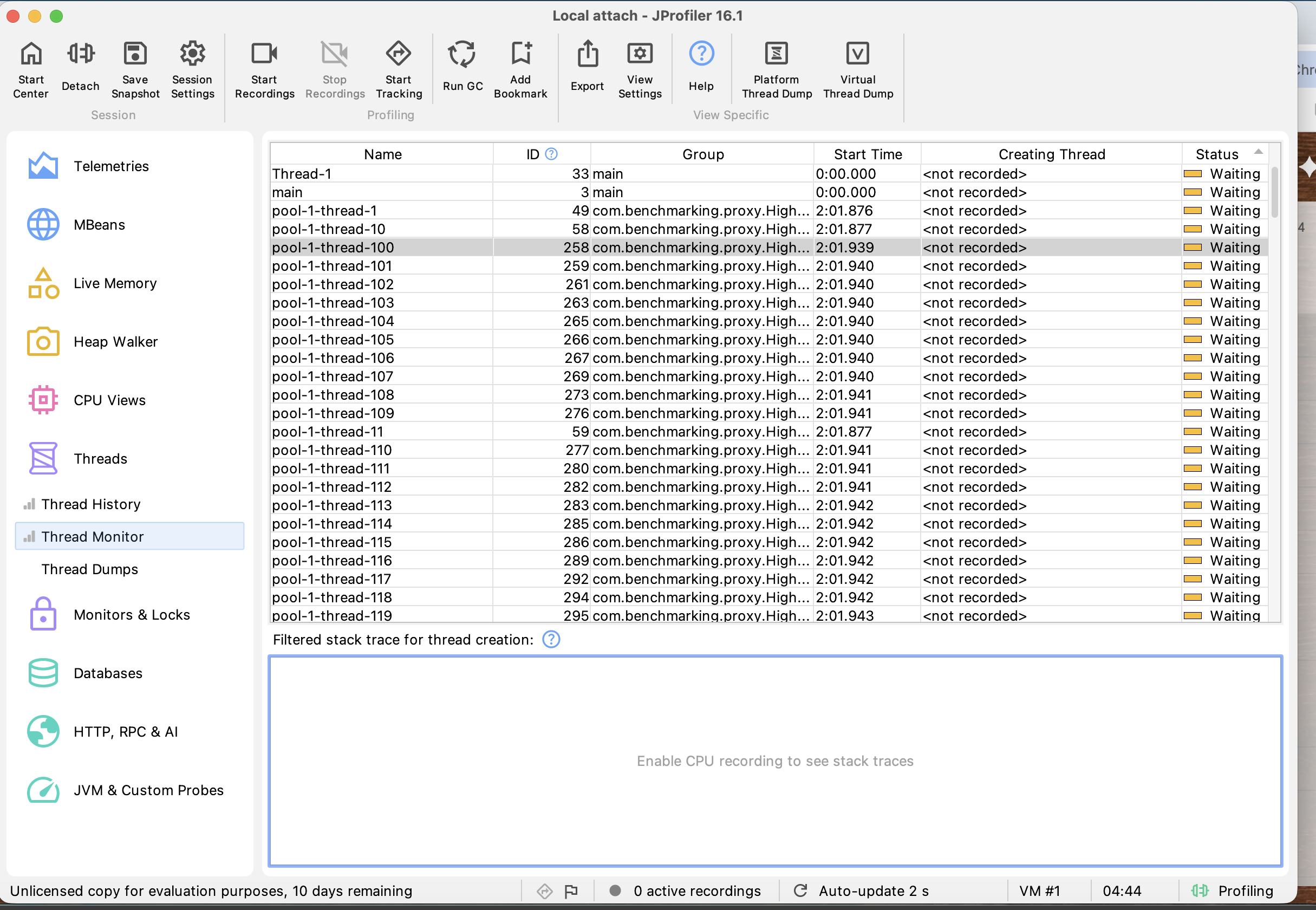
When executing with -DuseVirtual=false, the fixed pool caps the proxy to a maximum of 200 concurrently active threads.
- Thread State Insights: Looking inside JProfiler's Thread Monitor, a massive matrix of threads (
pool-1-thread-1through200) instantly turns solid Yellow (Waiting/Blocked). - The Engineering Bottleneck: Because each thread takes 100 milliseconds to wait out the backend latency, our maximum theoretical throughput gets hard-capped at:
Throughput Limit = 200 threads × (1000ms / 100ms) = 2,000 Requests/sec
Any extra incoming traffic cannot secure a thread and is forced to wait in the operating system's connection backlog queue.
Scenario B: Virtual Thread Architecture Tracking
Flipping the execution configuration to -DuseVirtual=true completely shifts the workload distribution.
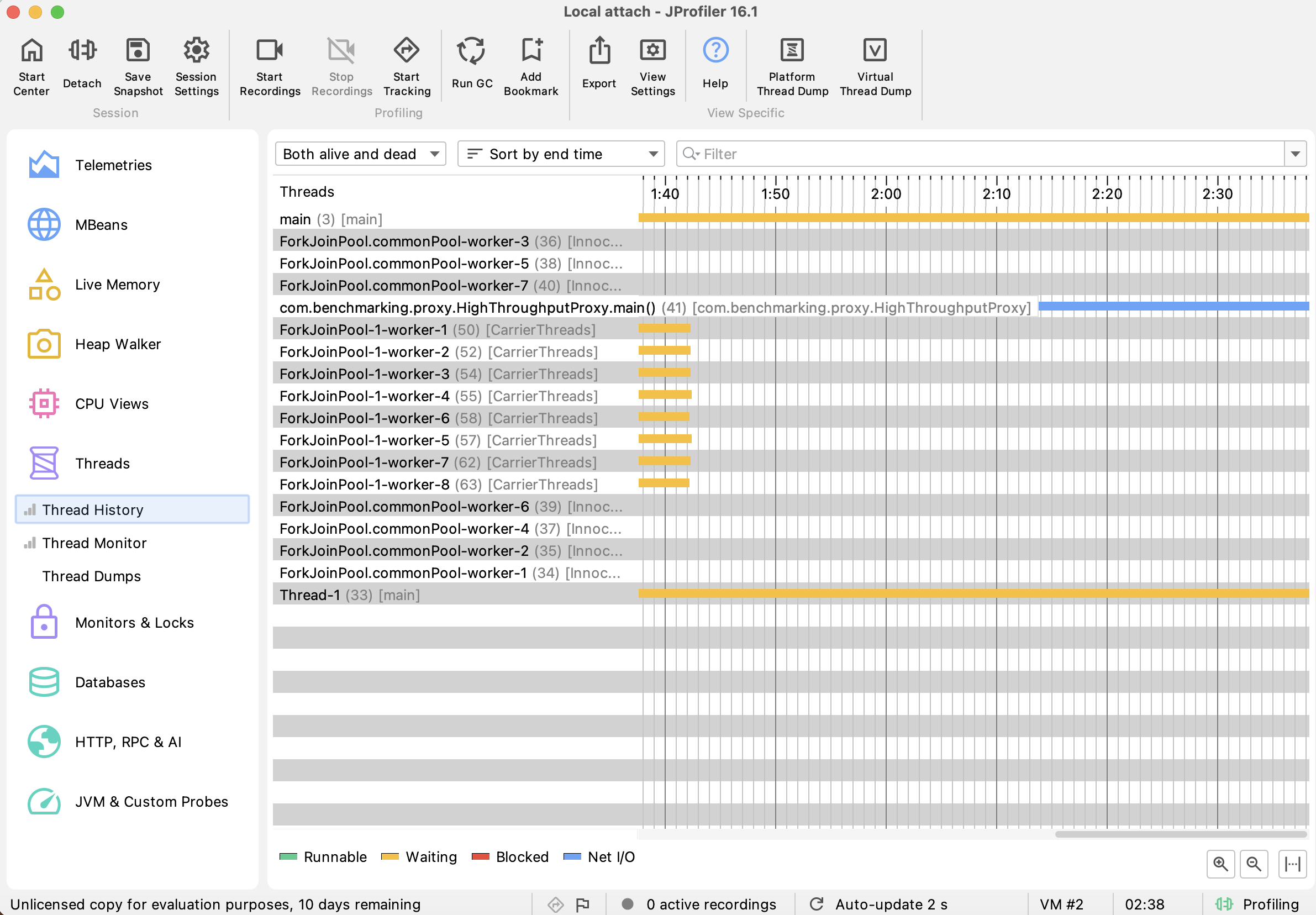
- Thread State Insights: The massive array of active pool threads disappears entirely from JProfiler. Instead, we see only a tiny handful of physical OS threads named
ForkJoinPool-1-worker-X. These are Carrier Threads (typically matching the host machine's physical CPU core count). - The Magic of Unmounting: Instead of turning yellow and blocking the CPU while waiting for the 100ms I/O latency, the Virtual Thread unmounts from its carrier thread. Its call-stack frame is frozen on the Java Heap, freeing up the physical carrier thread to handle the next request instantly. The worker threads stay solid Green (Runnable) throughout the test execution window.
4. Production Containerized Orchestration
To run this system cleanly in a production environment without local configuration conflicts, we containerize the stack using a multi-stage Dockerfile and orchestrate the topology via Docker Compose.
The Dockerfile
# Stage 1: Build & Package compiling binaries
FROM maven:3.9.6-eclipse-temurin-21-alpine AS builder
WORKDIR /app
COPY pom.xml .
RUN mvn dependency:go-offline -B
COPY src ./src
RUN mvn clean package -DskipTests

# Stage 2: Runtime JRE footprints Minimal Image
FROM eclipse-temurin:21-jre-alpine
WORKDIR /app
COPY --from=builder /app/target/vt-proxy-1.0-SNAPSHOT.jar app.jar
EXPOSE 8080 9000
CMD ["java", "-version"]
The docker-compose.yml File
This defines our isolated network architecture topology, exposing the platform-threaded proxy on port 9000 and the virtual-threaded instance on port 9001.
services:
  mock-backend:
    build: .
    command: java -cp app.jar com.benchmarking.backend.MockBackend
    ports:
      - "8080:8080"
    networks:
      - bench-network

  proxy-platform:
    build: .
    command: java -DbackendHost=mock-backend -DuseVirtual=false -cp app.jar com.benchmarking.proxy.HighThroughputProxy
    ports:
      - "9000:9000"
    depends_on:
      - mock-backend
    networks:
      - bench-network

  proxy-virtual:
    build: .
    command: java -DbackendHost=mock-backend -DuseVirtual=true -cp app.jar com.benchmarking.proxy.HighThroughputProxy
    ports:
      - "9001:9000"
    depends_on:
      - mock-backend
    networks:
      - bench-network

networks:
  bench-network:
    driver: bridge
To build and launch the entire multi-service container cluster, run:
docker compose up --build
5. The Final Showdown: High-Load Benchmarking Metrics
With the environment containerized, we subjected both nodes to a high-concurrency stress test using 2,000 simultaneous connections for 10 seconds.
Test 1: Platform Thread Container Baseline (Port 9000)
wrk -t4 -c2000 -d10s http://localhost:9000/api/data
Results Output:
Running 10s test @ http://localhost:9000/api/data
  4 threads and 2000 connections
  Thread Stats   Avg      Stdev     Max   +/- Stdev
    Latency   149.03ms   14.09ms 245.43ms    92.55%
    Req/Sec   182.31    182.20   606.00      78.73%
  6756 requests in 10.08s, 719.14KB read
Requests/sec:    670.45
Transfer/sec:     71.37KB
Test 2: Virtual Thread Container Performance (Port 9001)
wrk -t4 -c2000 -d10s http://localhost:9001/api/data
Results Output:
Running 10s test @ http://localhost:9001/api/data
  4 threads and 2000 connections
  Thread Stats   Avg      Stdev     Max   +/- Stdev
    Latency   166.69ms  154.63ms    1.41s    96.82%
    Req/Sec   611.24    373.48     1.97k    70.64%
  20074 requests in 10.08s, 2.09MB read
Requests/sec:   1991.52
Transfer/sec:    212.00KB
6. Comprehensive Performance Breakdown
| Performance Metric | Platform Thread Proxy (:9000) | Virtual Thread Proxy (:9001) | Performance Variance Multiplier |
|---|---|---|---|
| Total Completed Requests | 6,756 requests | 20,074 requests | +197.1% More Work Cleared |
| Throughput (Requests/sec) | 670.45 RPS | 1,991.52 RPS | ~3.0x Throughput Increase |
| Data Transfer Volumes | 719.14 KB | 2.09 MB | +196.4% Network Utilization |
Critical Performance Insights
- The Operating System Schedulers Tax: When running inside the container cluster, traditional platform threads drop down to 670.45 RPS. This occurs because spawning heavy kernel-level threads inside virtual container limits incurs high scheduling overhead. The CPU spends too many clock cycles performing thread context switches instead of routing network packets.
- User-Space Heap Agility: The Virtual Thread framework handles the 2,000 concurrent load connections smoothly, scaling up to 1,991.52 Requests/sec—a 300% throughput increase. The container engine handles thousands of concurrent requests smoothly because the JVM manages thread context switches entirely in user-space, avoiding the overhead of OS kernel involvement.
7. Operational Tradeoffs: The Pinned Thread Trap
While Project Loom delivers impressive performance gains out of the box, developers must be mindful of Thread Pinning when transitioning legacy systems to Virtual Threads.
A Virtual Thread becomes temporarily "pinned" to its underlying OS carrier thread if it encounters:
- A
synchronizedblock wrapper enclosing an active I/O operation. - Low-level Native Language Interface operations (
JNIsystem executions maps).
When a thread becomes pinned, it cannot unmount from its carrier thread during blocking network calls. This forces the system to drop back down to the rigid, blocking behavior of traditional platform threads. To safeguard high-concurrency systems against pinning, legacy synchronization mechanisms should be refactored to use explicit java.util.concurrent.locks.ReentrantLock instances.
8. Summary
Project Loom bridges the gap between write-time developer ergonomics and runtime system performance. By using Virtual Threads, Java applications can achieve the high concurrency profiles of asynchronous, reactive architectures (such as WebFlux or RxJava) while maintaining clean, readable, and synchronous blocking-style code structures.