I Built a RAG Chatbot That Answers Java Interview Questions From My Own Notes
A few weeks ago I was watching Andrej Karpathy's videos on LLMs and AI Jason's deep-dive on RAG, taking notes, and thinking "this all makes sense in theory." This week I actually built it. A working, deployed chatbot that answers Java interview questions by retrieving answers directly from my own markdown notes.
Here's exactly how I built it, what I learned, and the mistakes I made.
What I Built
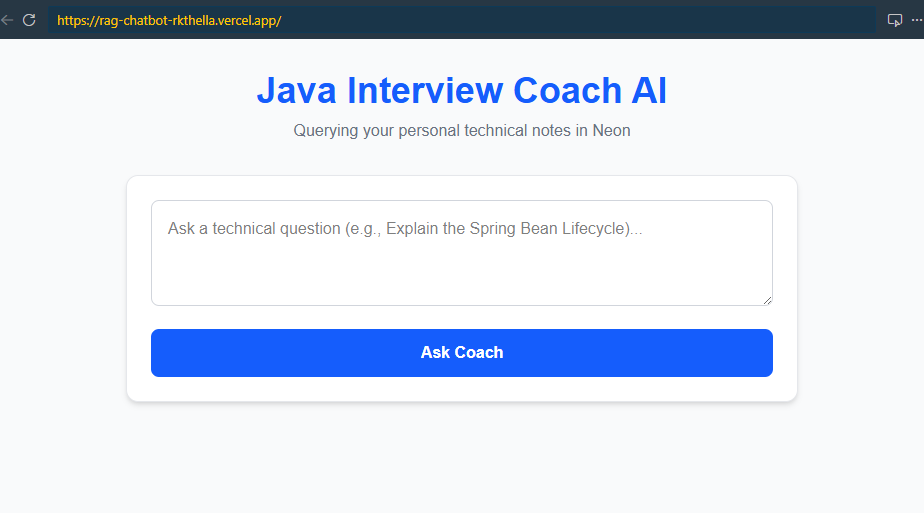
Java Interview Coach AI — a chatbot that:
- Takes a question like "Explain the Spring Bean Lifecycle"
- Searches my personal markdown notes using vector similarity
- Returns a precise, context-aware answer grounded in my own notes
- Is live at rag-chatbot-rkthella.vercel.app
The Stack
| Layer | Technology | Why |
|---|---|---|
| Frontend | Next.js 16 (App Router) + Tailwind CSS | Fast to build, zero-config deployment on Vercel |
| Backend | FastAPI (Python) on Vercel Serverless | Best Python AI ecosystem, co-deployed with the frontend |
| Orchestration | LangChain | Handles retrieval chains, document loading, splitting — no glue code |
| Embeddings | HuggingFace Endpoint (all-MiniLM-L6-v2) | Free API, 384-dimensional vectors, no cold-start penalty on serverless |
| Vector DB | Neon + pgvector (langchain-postgres) | Serverless Postgres, free tier, pgvector built in |
| LLM | Groq (llama-3.1-8b-instant) | Under 2-second responses, generous free tier |
| Deployment | Vercel (monorepo — Next.js + FastAPI together) | Single vercel.json routes everything |
The biggest decision was LangChain. I had initially planned to wire up psycopg2 and the Groq SDK by hand, but LangChain's PGVector, create_retrieval_chain, and document loaders saved me hours and are battle-tested in production.
How RAG Works In This App
Before I explain the code, let me explain the mental model. RAG has two phases:
Phase 1 — Indexing (runs once)
my_notes.md → DirectoryLoader → RecursiveCharacterTextSplitter → HuggingFace Endpoint embed → store in Neon via PGVector
Phase 2 — Retrieval + Generation (runs on every question)
user question → embed with HuggingFace → Neon pgvector similarity search → top chunks as context → Groq Llama 3.1 → answer
The key insight: the LLM never "reads" your files. It only reads the 3–5 most relevant chunks retrieved by vector similarity. That's what keeps it accurate and fast.
Step 1 — Setting Up Neon with pgvector
Neon is a serverless Postgres database with built-in support for the pgvector extension. You get a free tier with 512MB storage — more than enough for this use case. LangChain's PGVector handles the table schema and index creation automatically when you first run the ingest script.
-- pgvector is enabled by default on Neon
-- PGVector creates the collection table automatically on first use
-- collection_name = "interview_prep", 384 dimensions for all-MiniLM-L6-v2
CREATE EXTENSION IF NOT EXISTS vector;
You just need DATABASE_URL in your environment — LangChain takes care of the rest.
Step 2 — The Indexing Script (scripts/ingest.py)
This runs once locally to load your markdown files, split them into chunks, embed them via the HuggingFace API, and push everything to Neon.
# scripts/ingest.py
import os
from dotenv import load_dotenv
from langchain_community.document_loaders import DirectoryLoader, TextLoader
from langchain_text_splitters import RecursiveCharacterTextSplitter
from langchain_huggingface import HuggingFaceEndpointEmbeddings
from langchain_postgres.vectorstores import PGVector

load_dotenv()

# 1. Load all .md files from the ./data directory
loader = DirectoryLoader('./data', glob="./*.md", loader_cls=TextLoader)
docs = loader.load()

# 2. Split into overlapping chunks
text_splitter = RecursiveCharacterTextSplitter(chunk_size=600, chunk_overlap=100)
chunks = text_splitter.split_documents(docs)

# 3. HuggingFace Endpoint Embeddings — calls the HF Inference API, no local GPU needed
embeddings = HuggingFaceEndpointEmbeddings(
    huggingfacehub_api_token=os.getenv("HUGGINGFACEHUB_API_TOKEN"),
    repo_id="sentence-transformers/all-MiniLM-L6-v2"
)

# 4. Push to Neon — PGVector handles table creation and indexing automatically
vector_store = PGVector.from_documents(
    documents=chunks,
    embedding=embeddings,
    collection_name="interview_prep",
    connection=os.getenv("DATABASE_URL"),
    use_jsonb=True,
)

print(f"Successfully ingested {len(chunks)} chunks into Neon.")
A few things worth noting:
HuggingFaceEndpointEmbeddings vs local SentenceTransformer: I originally planned to run sentence-transformers locally for zero API cost. The problem is Vercel serverless functions have strict cold-start constraints and can't load a 90MB model. Using HuggingFaceEndpointEmbeddings instead calls HF's Inference API — same model quality, no bootstrap penalty.
RecursiveCharacterTextSplitter with chunk_size=600, chunk_overlap=100: The recursive splitter tries to split on paragraph breaks first, then sentences, then words — chunks end at natural semantic boundaries. The 100-token overlap ensures context from one chunk carries into the next.
Step 3 — The FastAPI Backend (api/index.py)
This is the entire backend. LangChain's create_retrieval_chain wires together vector retrieval and LLM generation in a single .invoke() call.
# api/index.py
from fastapi import FastAPI, Query
from langchain_postgres import PGVector
from langchain_groq import ChatGroq
from langchain_huggingface import HuggingFaceEndpointEmbeddings
from langchain_classic.chains import create_retrieval_chain
from langchain_classic.chains.combine_documents import create_stuff_documents_chain
from langchain_core.prompts import ChatPromptTemplate
import os
from dotenv import load_dotenv
from fastapi.middleware.cors import CORSMiddleware

load_dotenv()

app = FastAPI()

origins = [
    "http://localhost:3000",
    "http://127.0.0.1:3000",
    os.getenv("FRONTEND_URL", "*"),
]

app.add_middleware(
    CORSMiddleware,
    allow_origins=origins,
    allow_credentials=True,
    allow_methods=["*"],
    allow_headers=["*"],
)

# Must match the model and collection name used in ingest.py
embeddings = HuggingFaceEndpointEmbeddings(
    huggingfacehub_api_token=os.getenv("HUGGINGFACEHUB_API_TOKEN"),
    repo_id="sentence-transformers/all-MiniLM-L6-v2"
)

vector_store = PGVector(
    collection_name="interview_prep",
    connection=os.getenv("DATABASE_URL"),
    embeddings=embeddings,
    use_jsonb=True,
)

llm = ChatGroq(
    api_key=os.getenv("GROQ_API_KEY"),
    model="llama-3.1-8b-instant",
    temperature=0.1
)

prompt = ChatPromptTemplate.from_template("""
You are a helpful Technical Interview Coach.
Answer the user's question ONLY using the provided context from their notes.
If the answer is not in the context, politely say you don't have that information.

Context:
{context}

Question: {input}
""")

combine_docs_chain = create_stuff_documents_chain(llm, prompt)
rag_chain = create_retrieval_chain(vector_store.as_retriever(), combine_docs_chain)

@app.get("/api/chat")
async def chat(question: str = Query(..., alias="query")):
    try:
        response = rag_chain.invoke({"input": question})
        return {"answer": response["answer"]}
    except Exception as e:
        return {"error": str(e)}
The whole retrieval + generation pipeline is just rag_chain.invoke({"input": question}). LangChain handles: embedding the question, running the pgvector similarity query on Neon, stuffing the retrieved documents into the prompt, and calling Groq.
The endpoint is a GET with a query param — /api/chat?query=your+question — which makes it easy to test directly in a browser tab during development.
Step 4 — The Next.js Frontend (app/page.tsx)
The UI is intentionally minimal: a textarea, a submit button, and an answer card. No chat history needed for an interview prep tool — you ask one question, read the answer, think about it.
// app/page.tsx
"use client";
import { useState } from "react";

export default function Home() {
  const [query, setQuery] = useState("");
  const [answer, setAnswer] = useState("");
  const [loading, setLoading] = useState(false);

  const handleChat = async () => {
    if (!query) return;
    setLoading(true);
    try {
      const apiUrl = process.env.NEXT_PUBLIC_API_URL || "http://127.0.0.1:8000";
      const res = await fetch(`${apiUrl}/api/chat?query=${encodeURIComponent(query)}`);
      const data = await res.json();
      setAnswer(data.answer || data.error);
    } catch (err) {
      setAnswer("Failed to connect to the backend server.");
    } finally {
      setLoading(false);
    }
  };

  return (
    <main className="min-h-screen bg-gray-50 flex flex-col items-center p-8">
      <div className="max-w-2xl w-full space-y-8">
        <div className="text-center">
          <h1 className="text-4xl font-bold text-blue-600">Java Interview Coach AI</h1>
          <p className="text-gray-500 mt-2">Querying your personal technical notes in Neon</p>
        </div>

        <div className="bg-white p-6 rounded-xl shadow-md border border-gray-200">
          <textarea
            className="w-full p-4 border border-gray-300 rounded-lg focus:ring-2 focus:ring-blue-500 focus:outline-none text-black"
            rows={3}
            placeholder="Ask a technical question (e.g., Explain the Spring Bean Lifecycle)..."
            value={query}
            onChange={(e) => setQuery(e.target.value)}
          />
          <button
            onClick={handleChat}
            disabled={loading}
            className={`mt-4 w-full py-3 rounded-lg font-semibold text-white transition ${
              loading ? "bg-gray-400" : "bg-blue-600 hover:bg-blue-700"
            }`}
          >
            {loading ? "Searching Notes..." : "Ask Coach"}
          </button>
        </div>

        {answer && (
          <div className="bg-blue-50 p-6 rounded-xl border border-blue-100">
            <h2 className="text-sm font-bold text-blue-800 uppercase tracking-wider">
              Coach's Answer
            </h2>
            <div className="mt-2 text-gray-800 leading-relaxed whitespace-pre-wrap">
              {answer}
            </div>
          </div>
        )}
      </div>
    </main>
  );
}
NEXT_PUBLIC_API_URL is the Vercel deployment URL in production. During local dev it falls back to http://127.0.0.1:8000 where uvicorn is running.
Step 5 — Deploying to Vercel (Frontend + FastAPI as a Monorepo)
Both the Next.js frontend and the FastAPI backend deploy together as a single Vercel project — no Railway, no Render, no second service.
// vercel.json
{
  "builds": [
    { "src": "api/index.py", "use": "@vercel/python" },
    { "src": "package.json", "use": "@vercel/next" }
  ],
  "routes": [
    { "src": "/api/(.*)", "dest": "api/index.py" },
    { "src": "/(.*)", "dest": "/$1" }
  ]
}
Any request to /api/* is routed to FastAPI. Everything else goes to Next.js. One git push deploys both. NEXT_PUBLIC_API_URL is just the same Vercel URL — the frontend calls its own domain.
What I Learned
1. Use LangChain — don't manually wire the retrieval chain
My first prototype had raw psycopg2 queries, manual embedding calls, and manual prompt formatting. LangChain's create_retrieval_chain replaced 60 lines with 5. It's also much easier to swap components (different LLM, different vector store) without rewriting everything.
2. Use HuggingFaceEndpointEmbeddings, not local SentenceTransformer on serverless
Local sentence-transformers is great on your laptop. Loading a 90MB model on a Vercel serverless cold start will kill your function timeout. The HF Endpoint API hits HF's inference servers instead — same model quality, zero cold-start issues, still free on the HF free tier.
3. RecursiveCharacterTextSplitter beats naive fixed-size splitting
The recursive splitter respects natural document structure. Chunks end at paragraph and sentence boundaries rather than mid-sentence. The 100-token overlap means answers spanning a chunk boundary don't get lost.
4. Groq is genuinely fast
I expected latency. Groq returns answers in under 2 seconds. Their custom LPU (Language Processing Unit) hardware is not a gimmick.
5. Vercel monorepo deployment is underrated
One deployment, one set of environment variables, one domain. No cross-service latency, no second platform to manage.
6. The system prompt is critical
Without a strong "only use the provided context" constraint, the LLM answers from its training data and ignores your notes entirely. RAG only works if you explicitly instruct the model to stay grounded.
The Full Architecture
User
  │  types question in textarea
  ▼
Next.js frontend (Vercel)
  │  GET /api/chat?query=...
  ▼
FastAPI (Vercel Serverless Python)
  ├── HuggingFace Endpoint API  →  embed the question (384 dims)
  ├── Neon pgvector             →  find top-k similar chunks
  └── Groq llama-3.1-8b-instant →  generate answer from context
          │
          ▼
     { "answer": "..." }  →  displayed in blue answer card
What's Next
This was Month 1, Week 3 of my AI learning roadmap. Next steps:
- Add conversation memory — right now each question is stateless. Using LangChain's
ConversationBufferMemoryto make it contextual across turns - Add source citations in the UI — the API already returns source filenames via
response["context"], just need to surface them - Expand to all subjects — right now it's Java-heavy. I want to add Python, System Design, and Behavioral questions
- Evaluate retrieval quality — use RAGAS (RAG Assessment framework) to measure precision and recall of the retriever
Try It Yourself
The chatbot is live: rag-chatbot-rkthella.vercel.app
Ask it something like:
- "What is HashMap?"
- "Explain the Spring Bean Lifecycle"
- "What is Multithreading in Java?"
The whole thing — from watching Karpathy's videos to a working deployed product — took about 2 weeks of evenings and weekends alongside a full-time job. If I can do it, you can too.
Credits: AI Jason's RAG from Scratch series, Harrison Chase (LangChain), Nils Reimers (sentence-transformers), the pgvector team, and the Groq team for making fast inference accessible.